
Trading isn’t just about charts and indicators. At its heart, trading is the process of sending instructions to the market (orders) and managing the results of those instructions (positions).
Before diving into how the interface works, it’s crucial to understand these two fundamental concepts and why they matter.
What Are Orders? #
An order is a command you send to your broker telling them exactly how and when you want to buy or sell an asset.
Think of it as:
“Please execute this trade for me under these conditions.”
Orders can be:
-
Market orders — “Buy/sell immediately at the best available price.”
-
Limit orders — “Buy/sell only if the price reaches this level.”
-
Stop orders — “Trigger a buy/sell if the price crosses this threshold.”
-
More advanced types depending on the broker.
An order is not a trade yet. It may:
-
Execute instantly (filled),
-
Stay active until its conditions are met (working),
-
Expire,
-
Be canceled manually.
This is why the Orders panel exists:
to show everything you’ve asked the market to do, whether it already happened or is still pending.
What Are Positions? #
A position represents the actual result of your executed orders.
It shows how much of an asset you currently hold — long or short — and how it’s performing.
You have a position only when:
-
One or more orders have filled,
-
You now own (long) or owe (short) units of that asset.
A position reflects your exposure in the market:
-
Quantity you hold
-
Average fill price
-
Current market value
-
Profit or loss (P&L) that moves with the price
Sometimes, you may see positions that look unusual — for example:
-
Small leftover quantities due to partial fills
-
Rounding differences depending on the broker
-
Assets acquired as part of multi-leg orders
This is normal. Positions are a reflection, not an instruction. They show what you have, not what you want to do.
Why Orders and Positions Matter Together #
Orders describe your intent.
Positions describe your reality.
Together, they allow you to:
-
Track what you asked the system to execute
-
Understand what has actually executed
-
Manage your exposure
-
Close or adjust trades
-
Monitor live profitability
Without this distinction, trading would be confusing — positions would change “magically” and you’d never know why.
By separating orders (actions) from positions (results), everything stays clear and traceable.
The Orders Panel #
This panel displays all the orders you have placed, including their status and execution details.

Key information shown: #
-
Symbol — Asset you’re trading
-
Side — Buy or Sell
-
Type — Market, Limit, Stop, etc.
-
Price — Your order price (or execution price for market orders)
-
Quantity — Number of units
-
Avg Fill Price — Final price once the order is filled
-
Take Profit / Stop Loss — If attached
-
Placing time — When the order was created
-
Updated time — Last status update
-
Status
-
Filled: order completed
-
Working: active and waiting
-
Canceled
-
Rejected (rare, depends on broker)
-
Actions available: #
-
Cancel Order — Stop an active order from executing
-
Edit — Modify parameters when supported by the broker
This panel is your mission control for everything you’ve asked the market to do.
The Positions Panel #
This panel shows the open positions currently active in your account.
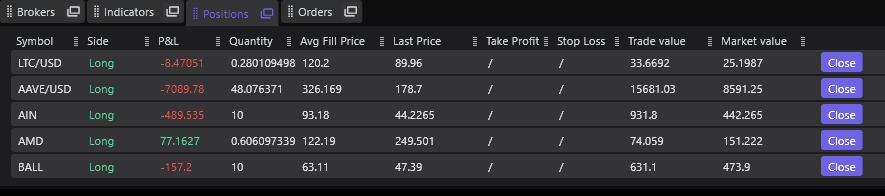
Key information shown: #
-
Symbol — Asset of the position
-
Side — Long or Short
-
P&L — Real-time profit or loss
-
Quantity — Current amount held
-
Avg Fill Price — The average price you paid (or sold for)
-
Last Price — Current market price
-
Take Profit / Stop Loss — If attached
-
Trade Value — Value at entry
-
Market Value — Value at current price
Actions available: #
-
Close — Immediately close the position (market order)
This action sends an order to offset the entire quantity and bring the position back to zero.
The Positions panel is your real-time snapshot of your market exposure.
How the Two Panels Work Together #
- You send an order (Orders panel).
- If it fills, a position is created or modified (Positions panel).
- You can close or adjust a position — which again creates new orders.
- Every action is traceable:
-
- Orders → What you asked
- Positions → What you currently hold
This creates a clear, intuitive workflow that mirrors how real brokers and exchanges operate.
Summary #
| Concept | What it means | Panel |
|---|---|---|
| Orders | “What I want to do.” Instructions to the market. | Orders Panel |
| Positions | “What I have.” Real exposure in the market. | Positions Panel |
Both panels together give you:
-
Transparency
-
Control
-
Traceability
-
Real-time understanding of your trading